Most people who are new to AI tools quickly discover a frustrating pattern: the first response sounds good, but it misses something important. So they try again, and again, each time getting something slightly different but never quite right. The problem usually isn't the AI. It's the prompt.
A prompt is simply the instruction or question you give an AI assistant. The quality of the response depends almost entirely on the quality of the prompt. Vague prompts produce vague answers. Well-structured prompts produce useful, accurate, repeatable results.
The 4-D method is a straightforward framework for writing prompts that work. It won't require technical knowledge or special software. You just need to think through four things before you type.
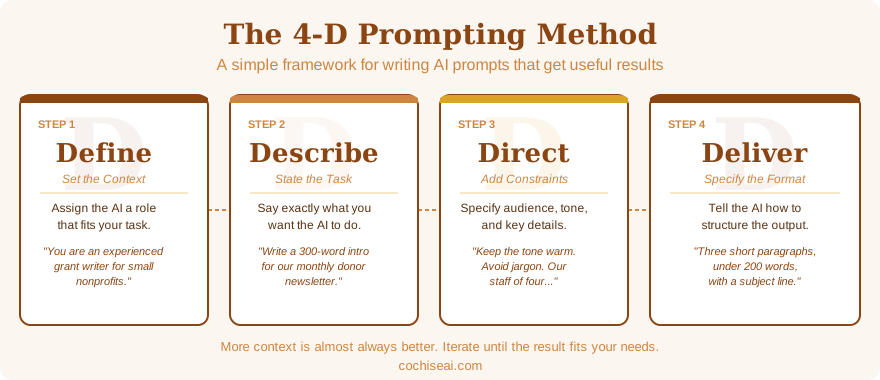
The Four Ds
Every effective prompt contains four elements: Define, Describe, Direct, and Deliver. You don't always need to write them as four separate sentences, but you do need to address all four. When a prompt produces a poor result, it's almost always because one of these four elements is missing or unclear.
Define: Set the Context
The first step is to tell the AI who it should be for this conversation. AI assistants can adjust their tone, expertise level, vocabulary, and focus depending on the role you give them. A response written for a grant reviewer sounds very different from one written for a volunteer coordinator, even if the underlying information is the same.
You define context by assigning a role at the start of the prompt. Common examples:
- You are an experienced grant writer for small nonprofits.
- You are a friendly technology trainer helping people who are not comfortable with computers.
- You are a professional editor reviewing content for tone and clarity.
You can also include relevant details about the audience: "You are writing for an executive director who is not technical but is comfortable making strategic decisions."
Setting context isn't strictly required for simple requests, but for anything involving writing, tone, or specialized knowledge, it makes a significant difference in output quality.
Describe: State the Task Clearly
This is the core of your prompt: what do you actually want the AI to do? Be specific and use active verbs. "Write," "summarize," "compare," "list," "rewrite," "explain" are all clearer starting points than "help me with" or "tell me about."
Weak descriptions:
- Help me with our newsletter.
- Tell me about AI policies.
- Make this better.
Stronger descriptions:
- Write a 300-word introduction for our monthly donor newsletter.
- Summarize the key elements a nonprofit AI use policy should address.
- Rewrite this paragraph to be clearer and more concise without losing the original meaning.
The more clearly you describe the task, the less the AI has to guess about what you want.
Direct: Add Specifics and Constraints
After describing the task, add the details that shape the response. This is where you narrow the AI's options and steer it toward the kind of output that will actually be useful. Direction can include:
- Audience: "Write this for people who have never used AI before."
- Tone: "Keep the tone warm and encouraging, not technical."
- Constraints: "Do not use jargon. Avoid lists; use short paragraphs instead."
- Context: "Our organization serves families in rural southeast Arizona. We have a staff of four and rely heavily on volunteers."
- Examples: "Here is a sample of our existing writing for reference: [paste text]"
Think of this step as giving the AI the kind of background you'd give a new colleague before assigning them a task. The more relevant context you provide, the less back-and-forth you'll need.
Deliver: Specify the Format
Finally, tell the AI how you want the response structured. Leaving format open means the AI will choose for you, and its choice may not fit your needs.
Format options to specify:
- Length: "Keep the response under 200 words." or "Write a full page."
- Structure: "Use bullet points." or "Write in paragraph form." or "Use headers for each section."
- Output type: "Give me a draft email." or "Provide a numbered checklist." or "Write this as a FAQ."
Being explicit about format saves editing time and ensures the output fits wherever you plan to use it.
Putting It Together
Here is an example of a weak prompt and a 4-D prompt addressing the same need:
Weak Prompt
Write something for our donors about our summer program.
4-D Prompt
Define: You are an experienced nonprofit communications writer.
Describe: Write a thank-you email to our annual donors introducing our summer youth literacy program.
Direct: Our organization, Cochise Valley Reads, serves K-8 students in rural Cochise County. Our donors are mostly local business owners and retirees who care about community. Use a warm, personal tone. Mention that the program runs July through August and served 87 students last year.
Deliver: Write the email in three short paragraphs, under 200 words total, with a subject line.
This prompt gives the AI a role, a clear task, essential context, and a specific format. The result will be far closer to usable than the first version.
A Few Practical Tips
You don't have to write the four elements as labeled sections. Once you've internalized the framework, you'll naturally include all four in a single well-written paragraph. The labels are a checklist, not a template you must follow literally.
Iteration is normal. Even a well-structured prompt may not produce a perfect result on the first try. Read the response critically and ask for revisions in the same conversation: "That's good, but shorten it by half" or "Change the tone to be less formal." The AI retains the context of your conversation and can refine accordingly.
Save prompts that work. If you develop a prompt for a task you do regularly, keep it in a document. Good prompts are reusable assets. A prompt that produces a strong monthly newsletter draft is worth far more over time than any single piece of content it generates.
More context is almost always better. Newer users tend to under-describe the task and over-expect the result. AI assistants are not mind readers. The more you tell them, the more useful they become.
Next Steps
The best way to learn prompting is to practice. Pick a task you actually need to do this week, write a 4-D prompt for it, and evaluate the result against what you would have written yourself. Most people are surprised by how quickly results improve once they apply a structured approach.
To see the 4-D structure applied to specific tasks, the Nonprofit Prompt Library and the Educator Prompt Library both provide ready-to-use prompts across a range of common work tasks. Reviewing those examples alongside this guide is a good way to solidify the pattern before you start writing your own.
If you'd like hands-on guidance, Cochise AI offers workshops and one-on-one coaching specifically designed for nonprofit and educational staff. You can reach George through the contact form to set up a conversation.