One of the most common questions nonprofit and school staff ask about AI tools is: "Am I allowed to use this?" Often the real question underneath that is: "Will I accidentally share something I shouldn't?" This guide answers that question plainly, with a practical framework you can use every time you open ChatGPT, Claude, or Copilot.
The short version: a lot of useful work is completely safe to do in AI tools. Some work requires a small modification before you type it in. And a narrow category of information should never go into an AI tool, full stop. Knowing which is which will let you use AI confidently instead of avoiding it out of uncertainty.
The Simple Test
Before you type anything into an AI tool, ask yourself this question: Could I read this out loud in a public meeting without any privacy concerns?
If yes, go ahead. If no, either scrub the sensitive details first (more on that below) or skip AI for that particular task.
This test works because most AI privacy concerns come down to one thing: free AI tools may store your conversations, and some use them to improve future models. You are not necessarily sending data to a human reviewer, but you cannot be certain your input disappears the moment you close the browser. Treat AI like a capable, helpful assistant who works in a shared office, not behind a locked door.
Three Categories of Information
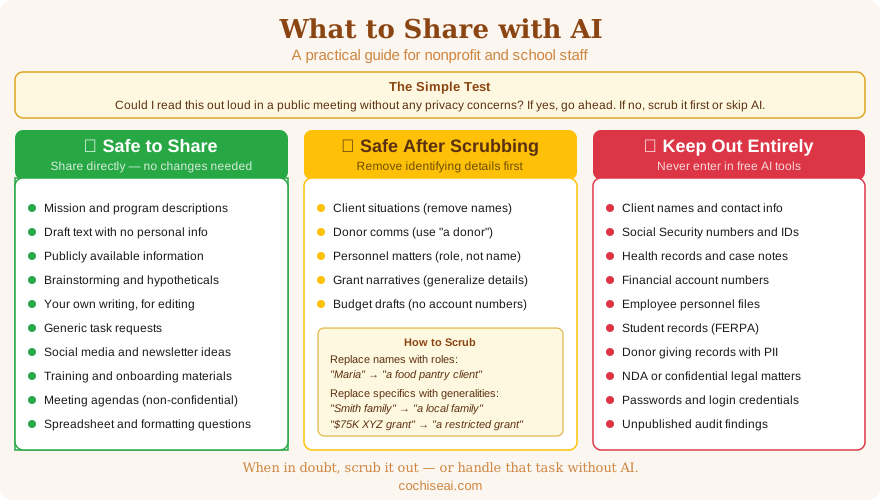
Think of the information you might share with an AI tool in three groups.
Safe to Share Directly
This information is appropriate to put into any AI tool without modification:
- General descriptions of your organization's work, mission, or programs (nothing confidential)
- Draft text you have already written that contains no personal information
- Publicly available information (news articles, published reports, website content)
- Hypothetical scenarios and brainstorming questions
- Your own writing that you want edited, shortened, or improved
- Generic task descriptions ("write a thank-you letter for a $500 gift")
- Meeting agendas that do not include personnel issues or confidential items
- Social media content drafts, event descriptions, and newsletter ideas
- Spreadsheet formulas, formatting questions, and technical how-to questions
- Training materials, onboarding guides, and program descriptions
Safe After Scrubbing
This information can be useful context for AI, but you need to remove or replace identifying details before you type it in. See the "How to Scrub" section below for examples.
- Client situations you want help communicating about (remove names, addresses, case numbers, and any detail that could identify the person)
- Donor communications involving a specific gift or situation (replace the donor's name with "a donor" or "a longtime supporter")
- Personnel situations you want help drafting a response to (describe the role, not the person)
- Grant narratives that mention real program participants (use general descriptions: "a family of four" instead of a name)
- Internal financial discussions, such as budget drafts (remove specific account numbers, fund names tied to restricted grants, or audit-sensitive figures)
Keep Out of AI Tools Entirely
This information should not go into free AI tools under any circumstances. If your work regularly involves this kind of data, talk to your leadership about whether a paid, enterprise-tier tool with a formal data processing agreement makes sense for your organization.
- Client names, addresses, phone numbers, or email addresses
- Social Security numbers, dates of birth, or government ID numbers
- Health information, diagnosis records, or case notes
- Financial account numbers, credit card numbers, or banking details
- Donor giving records that include personal identification
- Employee or volunteer personnel files, disciplinary records, or salary information
- Information shared under a nondisclosure agreement or confidentiality requirement
- Unpublished audit findings, legal matters, or board governance disputes
- Passwords, login credentials, or API keys
- Information about minors, including student records covered by FERPA
How to Scrub Information Before Using AI
The yellow category is where most of the useful work lives for nonprofits. You can still get AI help with client communications, grant narratives, and personnel matters — you just need to remove the identifying details first. This takes about 30 seconds and makes the task completely safe.
Replace names with roles or descriptions. Instead of "Maria, our food pantry client, is having trouble with transportation to appointments," write "a food pantry client is having trouble with transportation to appointments." The AI does not need the name to help you draft a response.
Replace specifics with generalities. Instead of "the Smith family at 423 Wilcox Street," write "a local family." Instead of "our $75,000 grant from the XYZ Foundation," write "a restricted program grant."
Describe the situation, not the person. For personnel matters, instead of "John from accounting has been leaving early without approval," write "a staff member in a financial role has been leaving early without approval." You will still get useful guidance on how to handle the situation.
Here is a before-and-after example:
Before scrubbing (do not type this into AI):
"Help me write a follow-up email to Robert and Linda Torres, who donated $2,500 at our November gala. They mentioned they were interested in naming a room in the new building."
After scrubbing (safe to use):
"Help me write a follow-up email to a couple who donated $2,500 at our annual gala. They mentioned interest in a naming opportunity for our new building."
The scrubbed version produces just as useful a draft. You simply fill in the names and any personal details when you review and edit the output — which you should always do anyway.
Does It Matter Which AI Tool I Use?
Yes, though perhaps not as much as you might think for most everyday tasks.
Free tiers of ChatGPT, Claude, and Microsoft Copilot are appropriate for the "safe" and "scrubbed" categories described above. By default, these tools may use your conversations to improve their models, though all three allow you to turn this off in your account settings. This is worth doing.
Paid organizational accounts (such as Microsoft 365 Copilot, ChatGPT Team, or Claude for Work) typically include data processing agreements that prohibit using your inputs for model training. If your organization regularly handles sensitive information and wants to use AI more deeply, a paid tier with a formal agreement is a reasonable investment. Ask your IT contact or consult with a technology advisor before committing.
Browser extensions and third-party AI tools deserve extra caution. If a tool is not from a major provider and you are not sure where your data goes, treat it as if you have no privacy protections at all until you can verify otherwise.
For most nonprofit staff using AI to draft communications, write grant narratives, and summarize documents, the free tiers with conversation history turned off are sufficient — provided you follow the scrubbing practices above.
Quick Reference: Before You Type
Run through this checklist before submitting any prompt that involves your organization's work:
- Does this include any client names, contact information, or case details?
- Does this include any donor names or specific giving amounts tied to a person?
- Does this include any employee names in connection with a personnel matter?
- Does this include confidential financial data, legal matters, or information under NDA?
- Does this include any information about minors?
If you checked any box, scrub the identifying details before you proceed. If you cannot scrub it and still get useful help from AI, handle that task without AI assistance.
Building Good Habits Across Your Team
Individual caution matters, but organizational habits matter more. A few low-effort steps can establish a privacy-conscious culture around AI use:
- Share this guide at a staff meeting. A 10-minute conversation about the green/yellow/red categories is often all it takes to give people a shared framework.
- Post the quick-reference checklist somewhere visible. A printed copy near a shared workstation or a link in your team's shared drive is a simple reminder.
- Pair this with an AI acceptable use policy. The AI Acceptable Use Policy Template on this site gives you the organizational framework; this guide gives staff the daily how-to.
- Encourage questions. When staff are unsure whether something is safe to share, they should feel comfortable asking — not just guessing.
You do not need to treat AI tools as dangerous to use them responsibly. Most useful nonprofit work with AI involves exactly the kind of information that is completely safe to share: drafting text, brainstorming ideas, summarizing public information, and building templates. The goal is simply to know where the line is so you can work confidently on the right side of it.
If you would like help building AI training for your staff or developing data handling guidelines specific to your programs, Cochise AI offers workshops designed for nonprofits and small educational organizations. Reach out through the contact form to start a conversation.