Meetings are one of the largest, least-examined costs in any nonprofit. Staff time spent in rooms preparing, attending, and following up on meetings adds up fast. AI tools will not make meetings shorter by themselves, but they can make the preparation sharper, the notes more useful, and the follow-up more consistent. Here is how to put them to work at each stage.
The Real Cost of a Poorly Run Meeting
A board meeting attended by eight people for two hours costs sixteen hours of collective staff and volunteer time, not counting preparation or follow-up. If participants arrive without reviewing materials, the first thirty minutes get spent on context-setting that should have happened beforehand. If no one captures clear action items, the same discussion happens again next month. The meeting itself is rarely the problem. The prep and follow-up usually are.
Most nonprofit staff handle meeting logistics on top of full workloads. There is rarely dedicated time to draft a thorough agenda, pull together background documents, or write detailed minutes the same day. AI tools do not replace that judgment, but they can dramatically reduce the time it takes to do the work well.
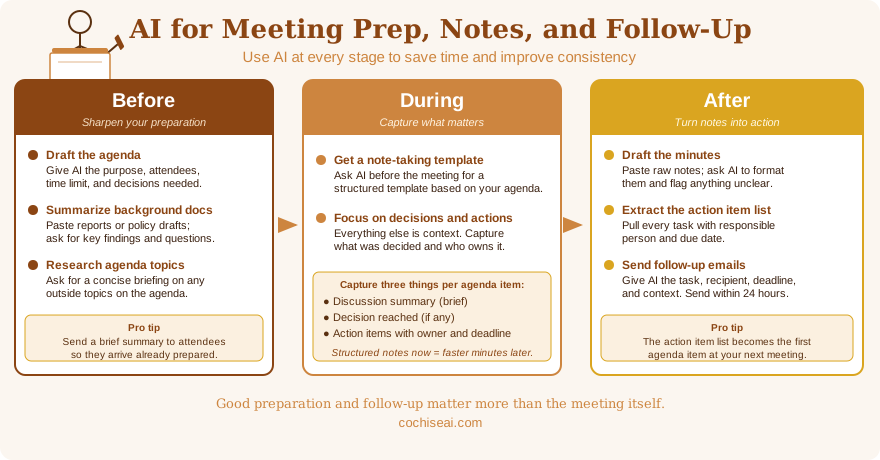
Before the Meeting: Preparation That Actually Gets Done
Good preparation usually comes down to two things: a clear agenda and enough background information so participants can engage meaningfully rather than asking basic questions during the meeting.
Drafting the agenda. Start by giving an AI assistant a plain-language description of what the meeting needs to accomplish. Include who will be in the room, any standing agenda items, and the specific decisions or updates that need to happen. A prompt like this works well:
I need to draft an agenda for our monthly board meeting. Attendees are the executive director and seven board members. Standing items include financial report, program updates, and old business. New items this month: approving the revised volunteer policy and a discussion about our fall fundraiser. The meeting runs ninety minutes. Please draft a timed agenda that leaves ten minutes at the end for announcements and open questions.
The AI will produce a structured draft in seconds. You review it, adjust the time allocations based on what you know about the group, and you have a professional agenda without starting from a blank page.
Preparing background summaries. If your meeting involves reviewing documents, such as a grant report, a policy draft, or financial statements, you can ask an AI assistant to summarize the key points before the meeting. Paste the document into the conversation and ask for a one-page briefing covering the main findings, any decisions required, and questions the group should consider. Board members who receive a clear two-paragraph summary alongside a lengthy report are far more likely to arrive prepared than those who receive only the report.
Researching context. If a meeting agenda item requires background on an outside topic, such as a regulatory change, a grant program, or a community issue, an AI assistant can give you a concise briefing. That gives you something concrete to share with participants rather than asking everyone to do their own research beforehand.
During the Meeting: Capture What Matters
AI tools cannot sit in the meeting with you, but they can make your note-taking more focused. The key is knowing in advance what you are trying to capture.
Before the meeting starts, ask an AI assistant to give you a simple note-taking template based on your agenda. It might look like this: one column for the discussion summary, one for decisions made, one for action items with owner and deadline. Having that structure in front of you keeps notes organized in real time instead of as a jumbled transcript you have to sort out later.
The most important things to capture during any meeting are the decisions and the action items. Everything else is context. If you come out of a meeting with a clear record of what was decided and who is doing what by when, the meeting was productive regardless of how detailed your notes are.
After the Meeting: Follow-Up That Does Not Fall Through the Cracks
This is where AI tools deliver the clearest return. After the meeting, paste your raw notes into an AI assistant and ask it to do several things at once.
Draft the minutes. Even rough, bullet-point notes can be turned into polished meeting minutes in a few minutes. A prompt like this works:
Here are my notes from today's board meeting. Please draft formal meeting minutes from these notes. Use this format: date and attendees at the top, then each agenda item as a section heading with a brief summary of the discussion, the decision reached (if any), and any action items. Keep the language neutral and factual. Flag anything in my notes that is unclear so I can fill in the gaps before sending.
Review the draft carefully. The AI may misread an abbreviation or combine two separate points. But starting from a structured draft is far faster than writing minutes from scratch, and the "flag anything unclear" instruction is useful because the AI will often catch gaps in your notes that you would not notice until someone asks a question later.
Extract the action item list. Ask the AI to pull every action item from your notes into a separate list with the responsible person and the due date. That list becomes the first item on the next meeting's agenda and the basis for any follow-up emails you need to send.
Draft follow-up communications. If the meeting produced tasks for specific people, an AI assistant can draft those follow-up emails in a consistent, professional tone. Give it the action item, the person's name, the deadline, and any relevant context. A well-written follow-up email sent within twenty-four hours of a meeting dramatically improves the odds that the task gets done.
A Note on What Goes Into the Prompt
The quality of what you get back depends on the quality of what you put in. Vague notes produce vague minutes. If your shorthand includes abbreviations or references that only make sense to you, the AI will either guess or flag them. The more context you give, the more useful the output.
You also do not need to send everything in one prompt. It is perfectly reasonable to ask for minutes first, review them, then ask for the action item list, then ask for a follow-up email for a specific person. Breaking the work into steps gives you a checkpoint to catch errors at each stage.
Getting Started
Pick your next meeting and try one piece of this workflow. Draft the agenda with AI assistance, or use it to summarize a background document you plan to distribute. You do not have to overhaul everything at once. Most people who try even one piece of this find that it saves enough time to make trying the next piece an easy decision.
If you would like help building a meeting workflow that fits your organization's specific needs, including templates for agendas, note-taking, and minutes, I offer hands-on coaching sessions for nonprofit teams in Cochise County. Use the contact form to get in touch.