Most nonprofits have years of institutional knowledge scattered across shared drives, email threads, and the heads of long-tenured staff. When someone leaves, that knowledge leaves with them. An AI-maintained wiki solves that problem by turning your existing documents into a single, organized, searchable reference that any team member can use in minutes.
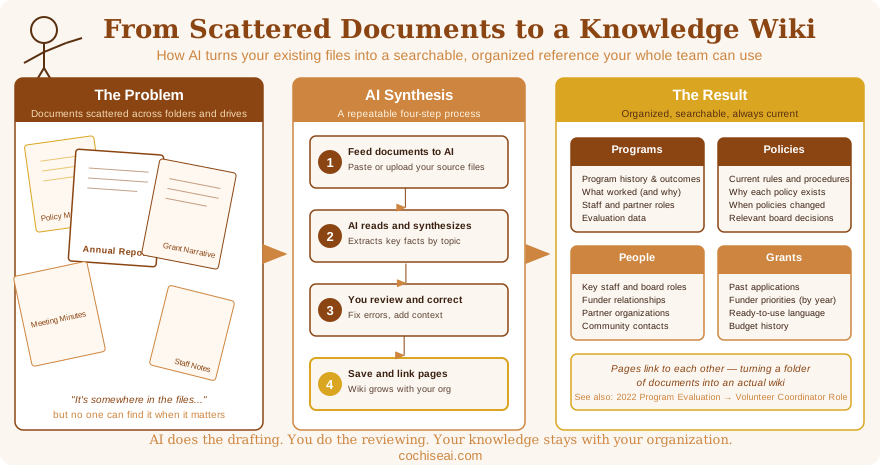
The Problem with Document Collections
Nonprofits accumulate documents over time: program reports, grant narratives, policy manuals, meeting minutes, historical records, research notes. The collection grows every year. The problem isn't having too many documents. The problem is that no one can find what they need when they need it.
A new staff member writing a grant proposal needs to know what your organization has said about program outcomes in past applications. A volunteer coordinator needs context about why a policy was written the way it was. A board member wants a quick overview of your organization's history before a donor meeting. In each case, the information probably exists somewhere in your files. But "somewhere" is not good enough.
The traditional solution is to hire someone to build a knowledge base or write a procedures manual. That works until the manual goes stale, which usually happens within a year. The AI-maintained wiki is different because it's designed to be updated, not archived.
What an AI-Maintained Wiki Actually Is
A wiki is simply a collection of short, focused pages organized by topic. Each page covers one subject: a program area, a key policy, a historical event, a person, a location. Pages link to each other where topics overlap. The whole thing lives in a folder on your computer or in a shared cloud tool like Obsidian, Notion, or even a shared drive.
What makes it "AI-maintained" is the process for creating and updating it. Instead of writing every page from scratch, you feed your source documents to an AI assistant and ask it to synthesize what those documents say about each topic. The AI reads the documents, identifies the relevant facts, and writes a concise wiki page. You review it, approve it, and add it to your collection. When new documents arrive, you do the same thing. The wiki grows with your organization.
The pages are not long. A typical wiki page is 200 to 400 words: the key facts, the important dates, the relevant people, and links to related topics. The goal is to give someone enough context to understand a subject quickly, not to replace the source documents.
A Real Example: Tombstone History Research
I recently built a wiki like this for my own research project. I manage a website about the history of Tombstone, Arizona, and over the years I've collected 64 source documents: academic journal articles, historical monographs, digitized newspapers, and government records. The documents are valuable, but reading all of them every time I need a specific fact is not practical.
Working with an AI assistant over two days, I turned those 64 documents into 37 focused wiki pages organized into four sections: topics (mining, social life, crime, infrastructure), people (Wyatt Earp, Nellie Cashman, Ed Schieffelin, and others), places (specific buildings, mines, and neighborhoods), and events (the OK Corral gunfight, the 1887 earthquake, the miners' strikes). Each page synthesizes what multiple sources say about that subject, notes where sources agree or disagree, and flags claims that need additional verification.
The immediate payoff was practical. I used the wiki to fact-check nine articles on my website. In several cases, the wiki caught errors I had published: a wrong distance, a misattributed name, a mine assigned to the wrong company. In other cases, it flagged good information in my research that I hadn't included in the articles yet. The wiki became a standing quality check, not just a reference tool.
How a Nonprofit Could Use This
The same approach works for any organization with a document collection. Here are a few concrete applications:
Program history. If your organization has run a tutoring program for fifteen years, you likely have annual reports, evaluation summaries, funder correspondence, and staff notes going back to the beginning. A wiki built from those documents gives any new program manager instant access to what worked, what didn't, and why decisions were made the way they were.
Grant writing support. Many funders ask applicants to describe their organization's history, past outcomes, and community partnerships. A wiki built from past grant applications and program reports becomes a library of ready-to-use language and verified statistics. Instead of searching through old applications, a staff member can look up "outcomes data" or "community partnerships" and find a synthesized summary with source citations.
Board onboarding. New board members often receive a stack of documents with little guidance on what matters most. A one-page wiki entry on each major program, each key policy, and each active funder relationship gives new members the context they need in a fraction of the reading time.
Policy and procedure documentation. Policies change, and the reasons for those changes often live only in meeting minutes or in the memory of whoever was in the room. A wiki page for each major policy, updated when the policy changes, preserves both the current rule and the reasoning behind it.
How to Get Started
You don't need any special software to try this. Here is a simple starting process:
First, pick a scope. Don't try to build a wiki for your entire organization in one sitting. Choose one program area, one time period, or one document type to start with. Ten documents is plenty for a first attempt.
Second, choose a tool to store the pages. Obsidian is free, works offline, and stores everything as plain text files you can move anywhere. Notion is browser-based and easier to share across a team. Even a shared Google Drive folder with one document per topic will work.
Third, ask an AI assistant to read your documents and write a wiki page on a specific topic. A prompt like this works well:
I'm building a reference wiki for our organization. Based on the documents I'm sharing with you, write a wiki page about [topic]. The page should be 200 to 300 words. Include key facts, important dates, relevant people, and any significant decisions or changes over time. Note anything the documents disagree about or leave unclear. Write in plain prose, not bullet points.
Paste or upload your source documents alongside the prompt. Review what the AI produces, correct anything that looks wrong, and save the page. Repeat for the next topic.
Fourth, link the pages. As you add more pages, add short links between related topics. "See also: Volunteer Coordinator role" or "Related: 2022 program evaluation." Those links are what turn a folder of documents into an actual wiki.
What This Takes
Building a modest wiki from an existing document collection takes one to two days of focused work for most organizations. That investment pays back quickly. Every grant application, board report, and staff onboarding conversation that draws on the wiki saves time and produces more accurate work than searching through files.
The ongoing maintenance is light. When a new report comes in or a policy changes, you spend fifteen minutes updating the relevant pages. The AI does the drafting; you do the reviewing. The wiki stays current because the process for updating it is simple enough that people actually do it.
Getting Help
If you'd like to try this with your organization but aren't sure where to start, I offer hands-on workshops that walk teams through the entire process, from document preparation to finished wiki pages. Organizations in Cochise County that have worked with me this way typically leave with a working wiki and the confidence to maintain it themselves. Use the contact form to start a conversation.